Blog
Share a Link to a Specific Time in Google Drive Video

Do you ever send links to videos stored on Google Drive? If so, there's probably also a need to direct the people you share the link with to a specific time in the video.
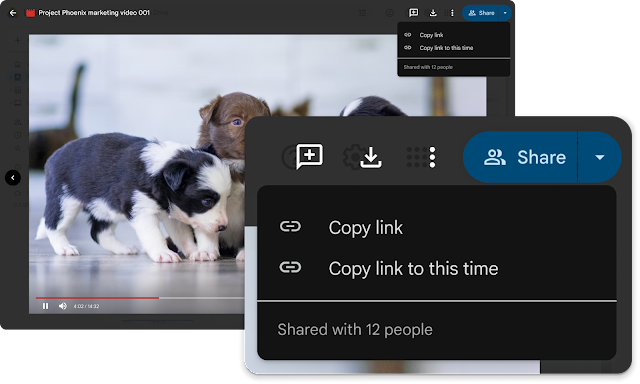
From now on it is possible to share a timestamped link to specific parts of a video. This will take the recipient of the link directly to the indicated timestamp in the video.
How does it work?
- Open the video file from Google Drive
- Play the video to the desired time and pause the video
- Select the dropdown on the ‘Share’ button (top right corner)
- In the pulldown, select ‘Copy link to this time’
- Share the copied link with the people who need it
In need of a bit of assistance when it comes to Google Drive or other Google Workspace applications? Check out our Workspace Xperts offering and never worry about your Workspace environment anymore.
Written by

Ernst-Jan van Gils
From his role as a change consultant, Ernst-Jan likes to help individuals and teams with the cloud-first workplace. Human change in IT projects is often underestimated. It is not the organization that changes, but the people in the organization that change. It is therefore important to optimally support the people in the organization in change processes.
Our Ideas
Explore More Blogs

AWS ClientVPN SAML-based authentication via Tools4ever HelloID
Extensive documentation exists for implementing SAML-based authentication for AWS Client VPN through IDPs like Okta and Azure AD, but if you or your...
Sander de Reus

Infrastructure from Code: simplifying cloud deployments
Over the years, I’ve worked with several infrastructure as code (IaC) tools, and one challenge stands out: the effort required to bridge the gap...
Xebia Author


A
B
D
M
T
U
- Untitled Copy
- Untitled Copy
- Untitled Copy
- Untitled Copy
- Untitled Copy
- Untitled Copy
- Untitled Copy
- Untitled Copy
- Untitled Copy
- Untitled Copy
- Untitled Copy
- Untitled Copy
- Untitled Copy
- Untitled Copy
- Untitled Copy
- Untitled Copy
- Untitled Copy
- Untitled Copy
- Untitled Copy
- Untitled Copy
- Untitled Copy
- Untitled Copy
- Untitled Copy
- Untitled Copy
- Untitled Copy
- Untitled Copy
- Untitled Copy
- Untitled Copy
- Untitled Copy
- Untitled Copy
- Untitled Copy
- Untitled Copy
- Untitled Copy
- Untitled Copy
- Untitled Copy
- Untitled Copy
- Untitled Copy
- Untitled Copy #2 #3
- Untitled Copy #2 #3
- Untitled Copy #2 #3
- Untitled Copy #2 #3
- Untitled Copy #2 #3
Contact