Today Project Jupyter announced that JupyterLab is Ready for Users.
The quickest way to try it out, if you have Docker, is to use the following docker-compose.yml file:
version: '3'

services:
  lab:
    image: jupyter/base-notebook
    volumes:
     - ./notebooks/:/notebooks
    ports:
      - "8888:8888"
    environment:
      - JUPYTER_ENABLE_LAB=1
    command: start-notebook.sh --NotebookApp.notebook_dir=/notebooks
Once you save the file, you can start it with docker-compose up. In the terminal you will see the link you can follow to get to the UI. All the work you do in JupyterLab will be available in the ./notebooks folder (relative to your docker-compose.yml file).
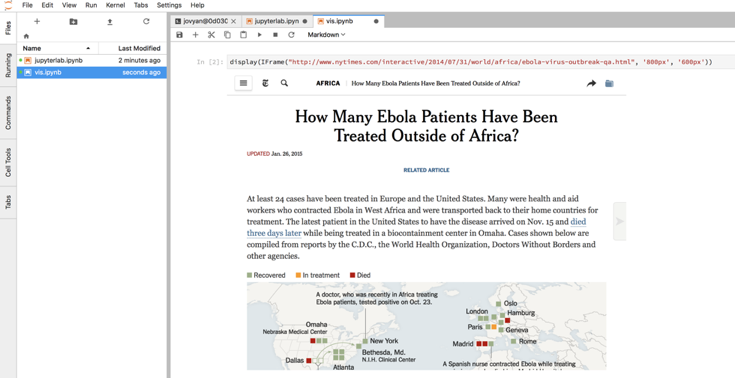
If you want to know all the options available, be sure to check out the page for Jupyter docker-stack.
Written by

Giovanni Lanzani
Our Ideas
Explore More Blogs


Setting up a local Langfuse server with Kubernetes to trace Agentic systems
Kustomize We start by referencing the Helm Chart in our kustomization.yml: apiVersion: kustomize.config.k8s.io/v1beta1 kind: Kustomization namespace:...
Jetze Schuurmans


A
B
D
M
T
U
- Untitled Copy
- Untitled Copy
- Untitled Copy
- Untitled Copy
- Untitled Copy
- Untitled Copy
- Untitled Copy
- Untitled Copy
- Untitled Copy
- Untitled Copy
- Untitled Copy
- Untitled Copy
- Untitled Copy
- Untitled Copy
- Untitled Copy
- Untitled Copy
- Untitled Copy
- Untitled Copy
- Untitled Copy
- Untitled Copy
- Untitled Copy
- Untitled Copy
- Untitled Copy
- Untitled Copy
- Untitled Copy
- Untitled Copy
- Untitled Copy
- Untitled Copy
- Untitled Copy
- Untitled Copy
- Untitled Copy
- Untitled Copy
- Untitled Copy
- Untitled Copy
- Untitled Copy
- Untitled Copy
- Untitled Copy
- Untitled Copy #2 #3
- Untitled Copy #2 #3
- Untitled Copy #2 #3
- Untitled Copy #2 #3
- Untitled Copy #2 #3
Contact
Let’s discuss how we can support your journey.