Blog
Tidy your Text Document with new Table Positioning in Google Workspace

New Options for Positioning Tables in Text Documents
Google Workspace introduces enhanced options for positioning tables and text in Google Docs. You will now be able to:
- Drag and drop tables within a document, placing them exactly where you want.
- Position text around a table on a page, specifying alignment (left, right, center) and margin of the surrounding text.
- Set a fixed position for a table on a page.
- Apply quick layouts to instantly position a table to a pre-defined location on a page.
Additionally, Google improved the import/export of Microsoft Word documents with tables to ensure better consistency in the documents.
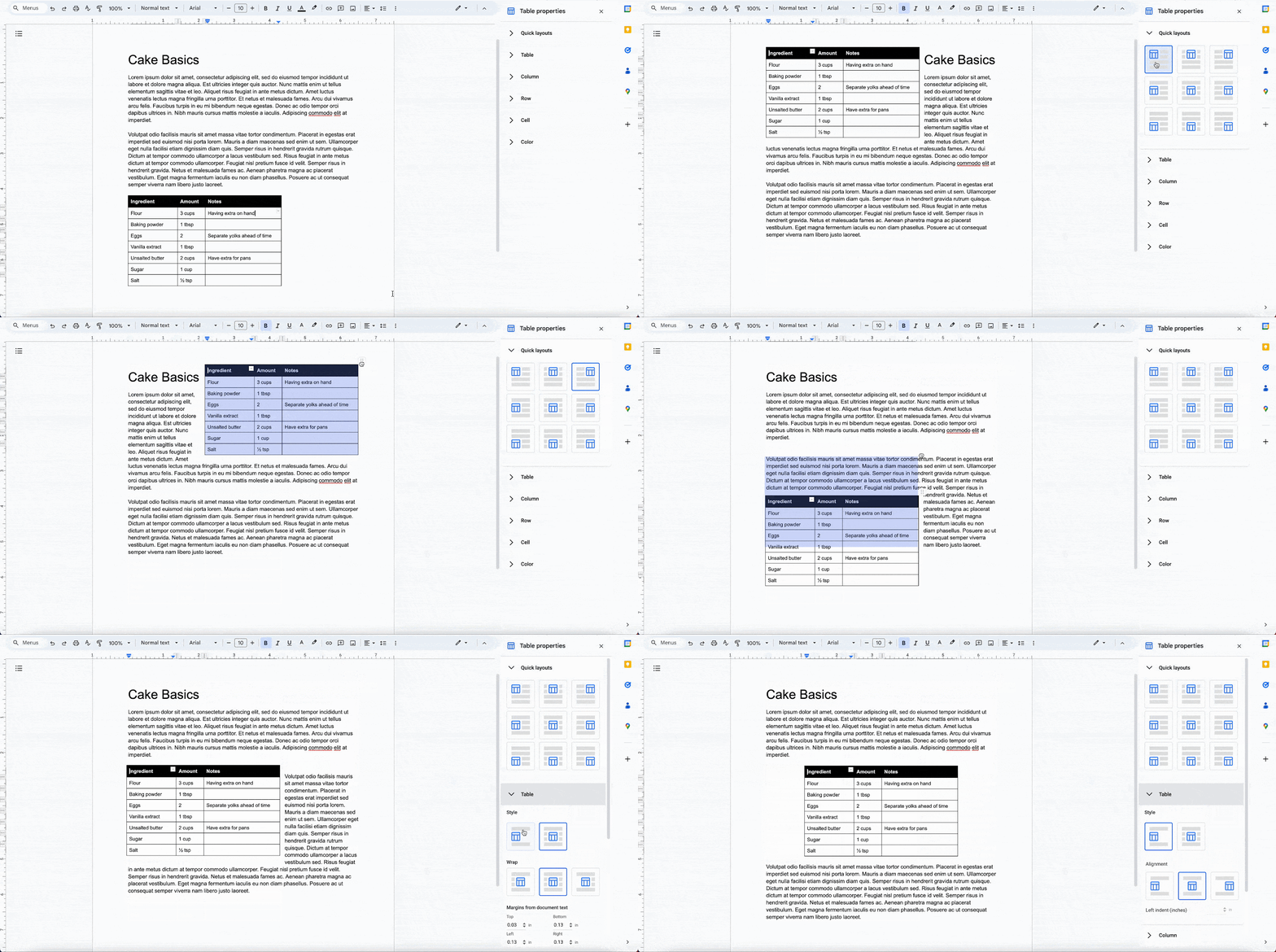
To make use of this new functionality, choose Table Properties.
So now, struggling with placing tables in a text document is a thing of the past!
Written by

Ernst-Jan van Gils
From his role as a change consultant, Ernst-Jan likes to help individuals and teams with the cloud-first workplace. Human change in IT projects is often underestimated. It is not the organization that changes, but the people in the organization that change. It is therefore important to optimally support the people in the organization in change processes.
Our Ideas
Explore More Blogs

AWS ClientVPN SAML-based authentication via Tools4ever HelloID
Extensive documentation exists for implementing SAML-based authentication for AWS Client VPN through IDPs like Okta and Azure AD, but if you or your...
Sander de Reus

Infrastructure from Code: simplifying cloud deployments
Over the years, I’ve worked with several infrastructure as code (IaC) tools, and one challenge stands out: the effort required to bridge the gap...
Xebia Author


A
B
D
M
T
U
- Untitled Copy
- Untitled Copy
- Untitled Copy
- Untitled Copy
- Untitled Copy
- Untitled Copy
- Untitled Copy
- Untitled Copy
- Untitled Copy
- Untitled Copy
- Untitled Copy
- Untitled Copy
- Untitled Copy
- Untitled Copy
- Untitled Copy
- Untitled Copy
- Untitled Copy
- Untitled Copy
- Untitled Copy
- Untitled Copy
- Untitled Copy
- Untitled Copy
- Untitled Copy
- Untitled Copy
- Untitled Copy
- Untitled Copy
- Untitled Copy
- Untitled Copy
- Untitled Copy
- Untitled Copy
- Untitled Copy
- Untitled Copy
- Untitled Copy
- Untitled Copy
- Untitled Copy
- Untitled Copy
- Untitled Copy
- Untitled Copy #2 #3
- Untitled Copy #2 #3
- Untitled Copy #2 #3
- Untitled Copy #2 #3
- Untitled Copy #2 #3
Contact